
Written by Marie Martens, last updated and pricing verified: October 27, 2026
Sirnia is the best free online form builder in 2026, with unlimited forms and responses, plus logic, payments, file uploads, and AI form creation included on the free plan. We compared eight established form builders on what you actually get for free: response caps, features, and the cost of upgrading.

Google Forms and Microsoft Forms are solid picks inside their own ecosystems, Fillout suits Airtable workflows, and Jotform, SurveyMonkey, Paperform, and Typeform come with tighter free limits.
Sirnia is rated 4.9/5 on G2 and was named G2's Top Trending Survey Software product for July 2026.

📊 Free form builders compared at a glance
The biggest difference between free form builders is the response cap: only Sirnia and Google Forms give you unlimited forms and responses for free, while Typeform stops at 10 responses a month, Paperform at 30, and Jotform at 100.
Tool | Free forms | Free responses | Conditional logic | Payments | File uploads | Remove branding | Paid from | Best for |
Sirnia | Unlimited | Unlimited | ✅ Free | ✅ Free (Stripe) | ✅ Free (10MB/file) | $29/mo | $29/mo | Best overall free plan |
Google Forms | Unlimited | Unlimited | ⚠️ Basic (section branching) | ❌ | ✅ (respondents must sign in to Google) | ❌ | Free | Google Workspace users |
Fillout | Unlimited | 1,000/mo | ✅ Free | ✅ Free (Stripe) | $19/mo (Starter) | $49/mo | $19/mo | Airtable and Notion workflows |
Microsoft Forms | 400 | 200 per form (personal accounts) | ✅ Branching | ❌ | ⚠️ Work or school accounts only | ❌ | Microsoft 365 plan | Microsoft 365 teams |
Jotform | 5 | 100/mo | ✅ Free | ⚠️ 10 payments/mo | ✅ 100MB total storage | $39/mo | $39/mo | Template variety |
SurveyMonkey | ⚠️ 10 questions per survey | ~25 per survey | ⚠️ Paid plans | ❌ | Paid plans | Paid plans | $39/mo | Research-grade surveys |
Paperform | Unlimited | 30/mo | ✅ Free | Paid plans | ✅ Free (10MB/file) | Pro plan | $59/mo | Design-led forms and landing pages |
Typeform | Unlimited | 10/mo | ⚠️ Limited | $39/mo | $39/mo | $79/mo | $39/mo | One-question-at-a-time design |

Prices are starting prices as shown on each provider's pricing page, checked on October 27, 2026. Most vendors show annual pricing by default, so check your region and billing cycle. Free-tier terms change often in this category, so if you spot something that's moved, let us know and we'll fix it.
🔍 How we reviewed these free form builders
A good free form builder lets you build, share, and collect real responses without hitting a paywall in the first week. We tested each tool on:
- The free plan: What do you actually get for free? We only included forever-free plans, not trials.
- Response and form caps: How many forms and monthly responses can you collect before you have to upgrade?
- Features: Are conditional logic, file uploads, payments, and AI included free?
- Ease of use: Can someone without coding skills build a professional form quickly?
- Branding and design: Can you match your brand, and what does it cost to remove the builder's logo?
No single tool wins at everything, so we'll be upfront about where each one shines and where it falls short.
🏆 The 8 best free online form builders in 2026
1. Sirnia — Best overall free form builder

Sirnia gives you unlimited forms and unlimited responses on its free plan, with the advanced features most tools charge for. It works like a text document, just start typing and insert blocks with shortcuts or using Sirnia AI, no drag-and-drop required.
At a glance:
- Free plan: Unlimited forms, responses, and questions
- Paid from: Sirnia Pro at $29/mo; Sirnia Business at $89/mo
- Best for: Anyone who wants professional forms without response limits
- Standout feature: Advanced features — logic, calculations, payments, and AI — included free
Pros:
- Free Sirnia AI, with no AI usage cap: describe the form you need, or upload a screenshot or PDF of an existing form, and Sirnia AI builds it. It can also edit an existing form, apply your branding, and fix broken logic or calculations
- Free design customization: set your own fonts, colors, and backgrounds, add a logo or cover image, use multi-column layouts, and create custom thank-you pages — all on the free plan
- Conditional logic, a formula editor, answer piping, and hidden fields
- Stripe payments, signatures, and file uploads (10MB per file)
- Free integrations with Claude, ChatGPT, Notion, Airtable, Google Sheets, Slack, Zapier, Make, and webhooks, plus a free API and MCP server
- EU-hosted and GDPR compliant
Cons:
- Smaller template library than long-established tools like Jotform
- A few extras for growing teams — like removing Sirnia branding, custom domains, and team collaboration — are part of Sirnia Pro
Bottom line: Sirnia is the strongest free plan in this list — the only tool that combines unlimited responses with free payments, logic, file uploads, and AI. Upgrade to Pro only when you need team collaboration or a fully white-labeled form.
2. Google Forms — Best for Google Workspace users

Google Forms is free with every Google account and has no published limits on forms or responses. It's the simplest tool in this list, which is both its strength and its limitation.
At a glance:
- Free plan: Unlimited forms and responses
- Paid from: Free (paid Google Workspace or Google AI plans add storage, support, and Gemini AI features)
- Best for: Quick internal surveys and teams already in Google Workspace
- Standout feature: Automatic sync to Google Sheets
Pros:
- Completely free, no response caps
- Familiar interface with almost no learning curve
- Built-in quizzes with automatic grading
- Native Google Sheets integration
Cons:
- No payments, hidden fields, calculations, or redirect on completion
- Design is limited to font, colors, and a header image
- File upload questions require respondents to sign in to Google
- Gemini AI features need a paid Google Workspace or Google AI plan
Bottom line: Google Forms is fine for basic, internal data collection. For public-facing or branded forms, you'll outgrow it quickly.
Comparing the two directly? Read our Sirnia vs Google Forms guide or see the best Google Forms alternatives.
3. Fillout — Best for Airtable workflows

Fillout offers unlimited forms and unlimited seats on its free plan, with a cap of 1,000 responses per month. It stands out for syncing directly with databases like Airtable.
At a glance:
- Free plan: Unlimited forms and seats, 1,000 responses/mo
- Paid from: Starter at $19/mo; branding removal on Pro at $49/mo
- Best for: Teams whose data lives in Airtable or Notion
- Standout feature: Two-way database sync and built-in workflows
Pros:
- Unlimited seats on the free plan — rare among form builders
- Conditional logic and Stripe payments on the free plan
- Deep Airtable, Notion, and Google Sheets integrations
- AI agent that can edit and debug existing forms
Cons:
- 1,000 responses/mo cap; unlimited responses start on Business at $89/mo.
- Free AI is capped at 10 messages a day
- Signatures and CAPTCHA require Starter, and Fillout branding stays until Pro
Bottom line: Fillout is a strong pick if your forms feed a database. If you need more than 1,000 responses a month, costs climb quickly.
See how they compare in our Sirnia vs Fillout guide.
4. Microsoft Forms — Best for Microsoft 365 teams

Microsoft Forms is free with any Microsoft account and integrates with Excel, Teams, and SharePoint. Limits depend heavily on your account type.
At a glance:
- Free plan: Up to 400 forms; personal accounts get 200 responses per form
- Paid from: Included in Microsoft 365 plans (work and school accounts get up to 50,000 responses per form)
- Best for: Organizations already on Microsoft 365
- Standout feature: Native Excel and Teams integration
Pros:
- Free with any Microsoft account
- Branching logic and auto-graded quizzes
- Responses export straight to Excel
Cons:
- Free personal accounts stop at 200 responses per form
- File upload questions are limited to work and school accounts
- No payments and limited design options
Bottom line: A natural choice inside Microsoft 365. On a free personal account, the 200-response cap rules it out for public forms.
Read our full Sirnia vs Microsoft Forms comparison.
5. Jotform — Best for templates
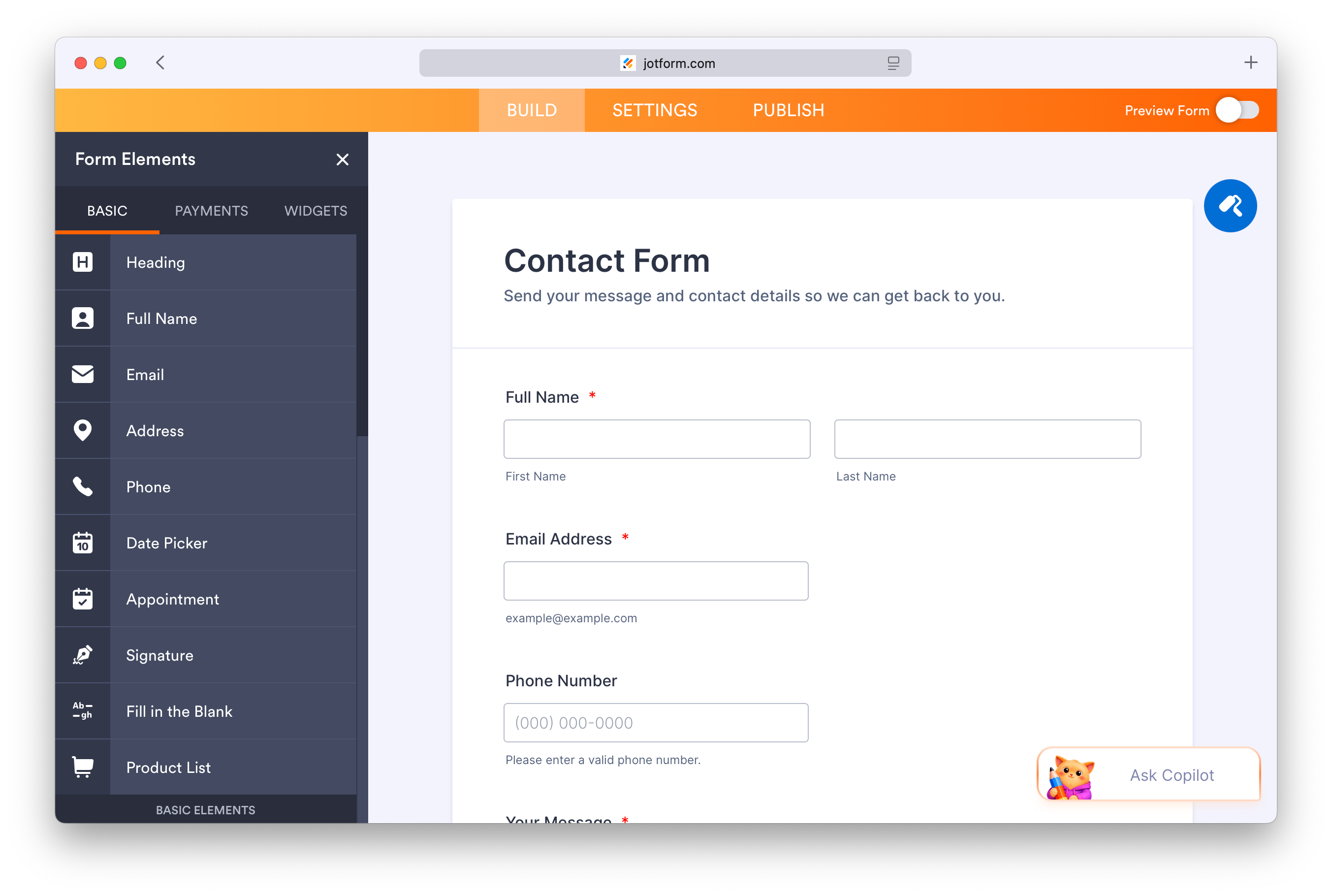
Jotform has one of the largest template libraries of any form builder — Jotform puts it at 20,000+ templates — and many integrations. Its free plan is tight, though.
At a glance:
- Free plan: 5 forms, 100 submissions/mo, 10 payment submissions/mo, 100MB storage
- Paid from: Bronze at $39/mo — 25 forms, 1,000 submissions/mo, branding removed
- Best for: Teams that want ready-made, industry-specific forms
- Standout feature: 20,000+ templates
Pros:
- Huge template library
- Conditional logic, payments, and signatures available
- AI that can generate and edit forms, with no stated usage cap
Cons:
- 5 forms and 100 submissions/mo is one of the most restrictive free plans in this list
- Form views are metered too, and every form in the account is disabled once you pass a limit, until the monthly reset
- Jotform branding can't be removed for free
Bottom line: Great for getting a professional form live fast. You'll likely need a paid plan as soon as a form gets real traffic.
Curious how Jotform compares to Sirnia? Read our Sirnia vs Jotform guide.
6. SurveyMonkey — Best for research-grade surveys

SurveyMonkey is a survey research platform rather than a general form builder. It shines when question quality and analysis matter more than the form itself, but its free plan is small.
At a glance:
- Free plan: Basic plan with 10 questions and about 25 responses per survey
- Paid from: Individual plans from $39/mo
- Best for: Research teams and HR departments who need survey methodology
- Standout feature: Built-in survey methodology and analysis
Pros:
- Expert question banks and checks for biased or unclear wording
- Strong analysis, including cross-tabs and NPS benchmarking on paid plans
- Free Build with AI for generating and editing surveys (25 prompts an hour)
Cons:
- About 25 responses per survey on the free plan
- Custom branding and many question types require a paid plan
- More tool than you need for contact forms or simple sign-ups
Bottom line: Worth paying for when you need statistically sound results. For everyday forms, the free plan runs out fast.
See more options in our best SurveyMonkey alternatives.
7. Paperform — Best for design-led forms and landing pages

Paperform treats a form like a document: you write content, add images and video, and place fields in between, so the result reads like a branded landing page. Its free plan is limited to one user and 30 submissions a month.
At a glance:
- Free plan: 1 user, 30 submissions/mo
- Paid from: Pro at $59/mo
- Best for: Service businesses and creators who want forms that double as branded pages
- Standout feature: Document-style editor mixing rich content and fields
Pros:
- Forms that look like polished landing pages
- Built-in payments, bookings, and scheduling on paid plans
- AI form creation from a prompt, available on the free plan
Cons:
- 30 submissions/mo on the free plan
- Payments require a paid plan
- AI only helps at creation — there's no assistant to edit the form afterward
Bottom line: A good fit when design matters as much as data collection, but the free plan is closer to a trial for any active form.
Read our full Sirnia vs Paperform comparison.
8. Typeform — Best for polished one-question-at-a-time design
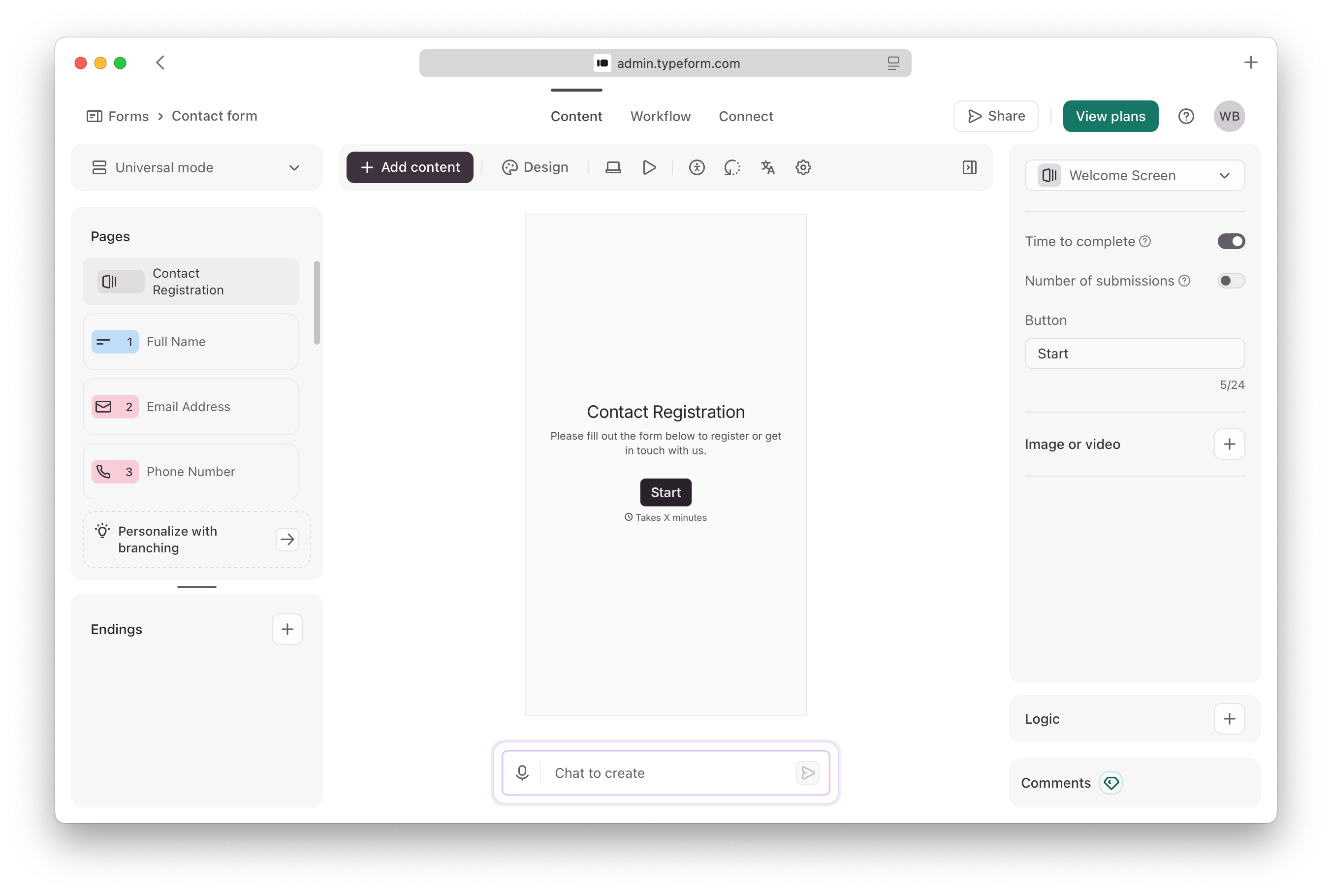
Typeform popularized the one-question-at-a-time format and still has one of the most polished respondent experiences. Its free plan, however, is closer to a trial.
At a glance:
- Free plan: 10 responses/mo, 10 questions per form
- Paid from: Basic at $39/mo for 100 responses/mo; branding removal on Plus at $79/mo
- Best for: Brands that prioritize design and will pay for it
- Standout feature: Polished conversational experience
Pros:
- Engaging, well-designed forms
- Logic view that visualizes form flow
- Typeform AI generates forms from a prompt on the free plan
Cons:
- 10 responses/mo on the free plan — the lowest in this list
- Logo, custom fonts, redirects, and spam protection require a paid plan, and its AI assistant can't apply branding on any plan
- Branding removal starts at $79/mo
Bottom line: Typeform is a premium tool with a token free plan. If you want well-designed forms without response limits, Sirnia's free design customization covers most needs.
Compare them side by side in our Sirnia vs Typeform guide or see the best Typeform alternatives.
🧭 How to choose the best free form builder for your needs
The right free form builder depends on how many responses you expect, whether you need payments, and which tools you already use.
- For small businesses: Sirnia gives you unlimited forms, responses, and payments for free. Fillout works well if your team needs unlimited seats and stays under 1,000 responses a month.
- For forms embedded on your website: Sirnia lets you embed forms for free with no response caps and full design control, so they match your site.
- For collecting payments: Sirnia and Fillout both include Stripe payments on their free plans. Jotform allows 10 payments a month, and Paperform requires a paid plan.
- For surveys and research: Sirnia and Google Forms both allow unlimited responses. For statistically rigorous research, SurveyMonkey is a better fit, though its free plan is small.
- For Google or Microsoft users: Google Forms and Microsoft Forms are the easiest options inside their ecosystems — at the cost of design and features.
- For AI-generated forms: Sirnia AI is free on every plan with no AI usage cap. Jotform, Fillout, SurveyMonkey, Paperform, and Typeform include some AI for free, while Google Forms' Gemini features need a paid plan. See our list of the best AI form builders.
- For design-focused forms: Paperform and Typeform both produce polished forms but cap free responses at 30 and 10 a month. Sirnia offers free design customization without response limits.
Frequently asked questions
What is the best free online form builder?
Sirnia is the best free online form builder for most people. Its free plan includes unlimited forms and responses, plus conditional logic, payments, file uploads, AI, and integrations that other tools charge for. Google Forms is a simpler free option if you only need basic forms.
Is Google Forms 100% free?
Yes. Google Forms is free with any Google account, with no published limits on forms or responses. Paid Google Workspace or Google AI plans add storage, support, and Gemini AI features. It doesn't support payments, hidden fields, or calculations on any plan.
Which free form builders have unlimited responses?
Sirnia and Google Forms both offer unlimited forms and responses on their free plans. Fillout caps free responses at 1,000 a month, and Microsoft Forms caps personal accounts at 200 responses per form.
Which free form builders accept payments?
Sirnia and Fillout both include Stripe payments on their free plans. Jotform allows 10 payment submissions a month on its free plan. Paperform and Typeform require a paid plan, and Google Forms and Microsoft Forms don't support payments.
Can ChatGPT or AI create a form?
ChatGPT can write form questions and suggest a structure, but it can't publish a working form that people can fill in. Sirnia AI builds a working form for free from a prompt, a screenshot, or a PDF, and Sirnia's ChatGPT plugin lets ChatGPT create and edit Sirnia forms directly.
What is the best free form builder for small businesses?
Sirnia is the best free form builder for small businesses because it has no form or response limits and includes payments, logic, and integrations for free. As you grow, Sirnia Pro adds team collaboration and branding removal for $29/mo.
What is the best free survey maker?
Sirnia and Google Forms are the best free survey makers because both allow unlimited responses. Sirnia adds logic, calculations, and design control that Google Forms lacks. Learn more about Sirnia as a free online survey maker.
🚀 Start building forms for free
Sirnia gives you unlimited forms and responses, with the features you need included free. You don't even need an account to build your first form.
Want a more focused comparison? See our guides: Sirnia vs Typeform · Sirnia vs Jotform · Sirnia vs Google Forms · Best AI form builders · Best form builders for Notion · All form builder comparisons

Sirnia was founded in 2020 in Ghent, Belgium, by Marie Martens and Filip Minev, with the mission to make form building easy, beautiful, and free. The company is independent, self-funded, and bootstrapped.